(New) Reference Attribute Picker
Pick which properties of a linked record show inline on a reference field — see the attributes you care about without opening the linked element.
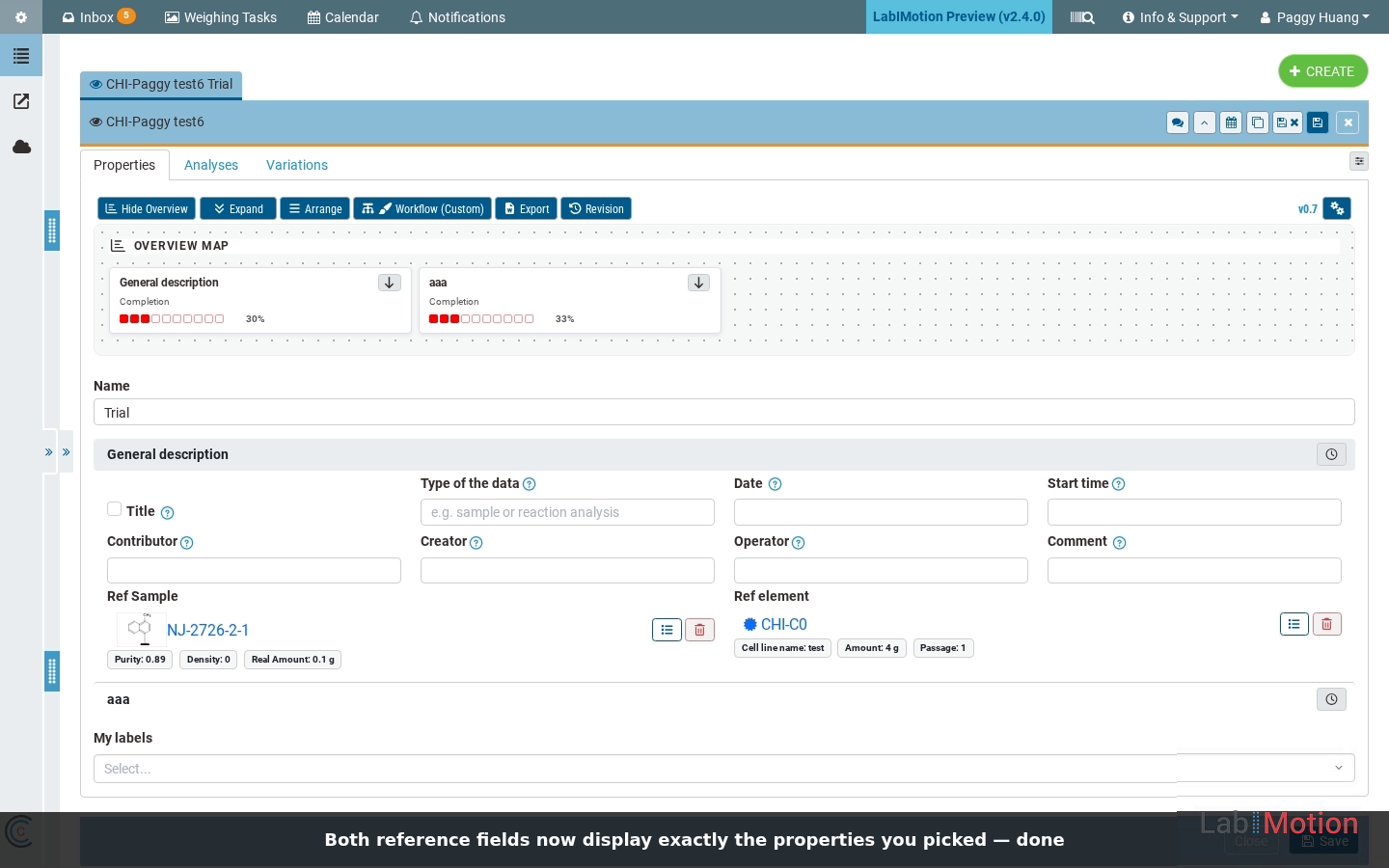
Generic records can carry reference fields that link to another record — a linked sample, a linked molecule, and a linked element. With Reference Attribute Picker, each reference gets a list icon ( ) that opens a checkbox dialog of the linked record’s properties. Tick the ones you care about, press Apply, and those attributes render inline on the field — so the form shows exactly the properties you want without ever opening the linked record.
Table of Contents
Key Features
Audience: Researchers
Interface: Chemotion ELN / Generic Element, Segment, Dataset
- Inline linked attributes: Show a linked record’s key properties directly on the reference field — no need to open the linked sample or molecule or element to read them.
- Pick exactly what matters: A Select linked element attributes dialog lists the linked record’s properties as checkboxes; tick only the ones relevant to this form.
- Independent per reference: Each linked element, linked sample, and linked molecule can be configured separately, each showing its own chosen attributes side by side.
- Non-destructive: The attribute picks are a display choice — nothing on the linked record is changed and no data is written.
Example Scenarios
Scenario: Displaying Attributes from Multiple Linked Records
- Open a generic element and go to its Properties form; scroll to the Ref Sample and Ref element fields.
- Open the picker: Click the list icon ( ) next to a reference to open the Select linked element attributes dialog.
- Tick the properties you want to display — for a Ref Sample that might be Purity / Real Amount / Density; for a Ref element (cell line) Cell line name / Amount / Passage.
- Apply: The chosen properties appear inline on the field as compact chips.
- Repeat for the other reference — each field keeps its own selection.
(Click the video to open in a new window )
(Click to view in a new window )
How It Works
- The selection is a view, not a copy. You choose which of the linked record’s attributes to surface; the values are read from the linked record, so what you see stays in step with the source.
- Each reference is configured on its own. Every linked record maintains its own attribute selection, allowing a single form to display different sets of attributes for different references. For example, one form can display a linked sample’s Purity and Amount alongside a linked molecule’s Molecular Weight and Formula.
- Nothing is persisted to the link. The picker only controls what displays — it never writes to or alters the linked element.
Note: This feature is currently in preview and may undergo further refinements based on user feedback.
🚀 How to Participate in the Preview
Follow these steps to explore the new features and share your insight:
🖥️ Visit the Staging Instance
Access the preview environment at: labimotion-stage.ibcs.kit.edu🔍 Explore and Test
Try out the enhancements — see how they fit your workflow.❤️ Your Feedback Matters
Share your comments or report any issues in our GitHub Discussions.
We appreciate your help in testing these new features!