(New) Template Ownership & Sharing
Every Designer template now has an owner, who decides who else may view, edit, or take it over.
Until now, any designer of a family — elements, segments or datasets — could edit or delete any template in it, with nothing recording whose work it was. From this release, each template has an owner, and colleagues work on it by invitation or by asking.
Table of Contents
Key Features
Audience: Designers
Interface: Chemotion ELN / Generic Elements, Segments and Datasets Designer
- Every template gets an owner: one named designer per template, shown in a new Owner column in the Designer grid.
- Share it deliberately: the owner grants colleagues Viewer (look, don’t touch) or Editor (draft, can’t release) access from a new +Share dialog, or hands the template over entirely with Transfer ownership.
- Ask when you need it: on a template you can’t open, a Request access button lets you ask the owner directly; they see it waiting in their Share dialog and in a new inbox.
- Three tabs to browse by: Owned by me, Shared with me, and All — so you can still find and request access to any template in the instance.
- Delete moved to a Danger zone: deleting a template is now owner-only, behind a confirmation checkbox, separate from everyday actions.
What It Looks Like
The Designer grid gains one new column — Owner — plus the sharing icons in Access. Here’s the real Generic Elements Designer, on the All tab: some templates are owned by Paggy Huang, one by Nicole Jung, the rest still by the system’s ELN Admin account:
(Click to view in a new window )
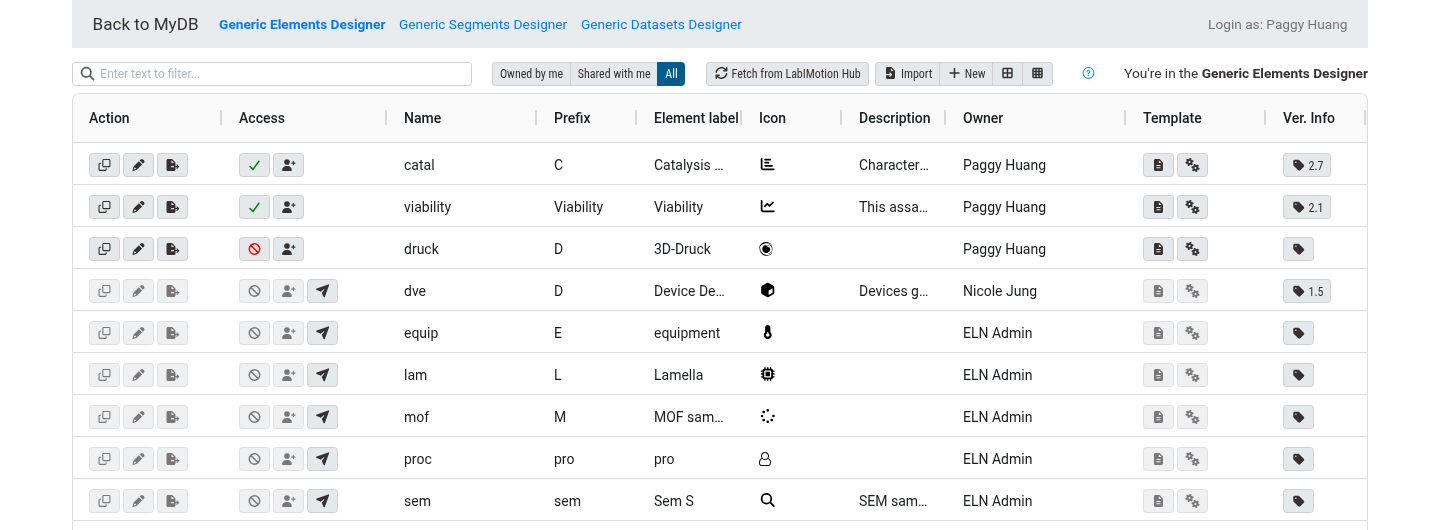
The green check or red no-entry icon under Access is the Active toggle — whether the template is switched on for the instance — and has nothing to do with who can open it. The person-plus button next to it, Share this template, is enabled only for the owner; everyone else sees it greyed out. A row you don’t have access to also carries a paper-plane button — Request access. Click it, and it turns into a clock with a tooltip confirming the request is waiting.
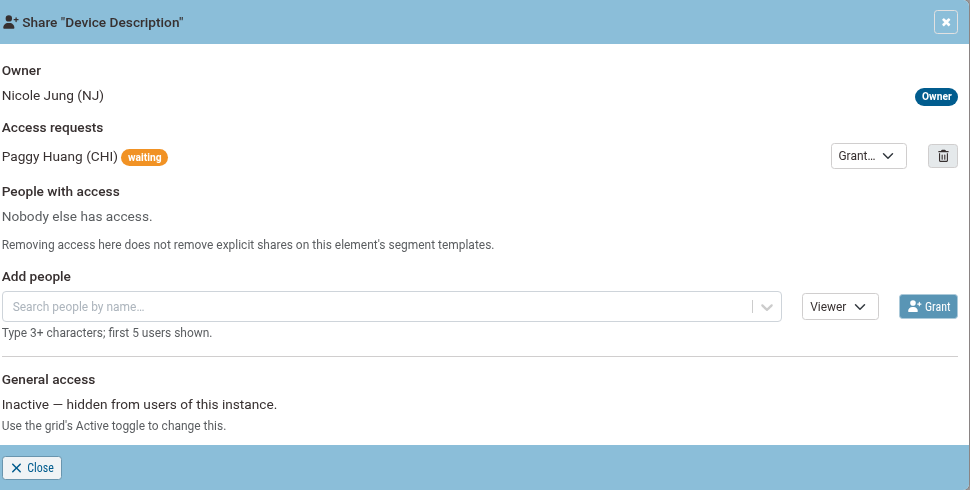
Opening Share this template on “Device Description” (owned by Nicole Jung) shows Paggy’s request still pending:
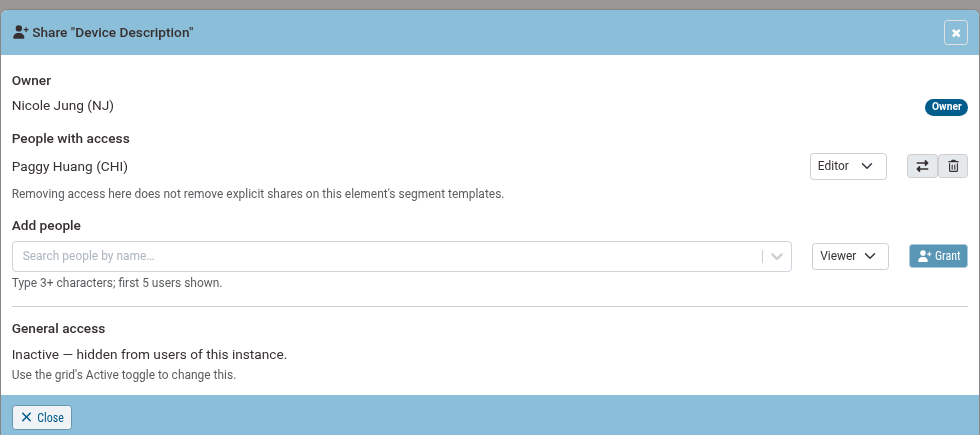
Nicole picks Editor from the Grant… dropdown next to the request. The request row is replaced by a People with access row, with a level dropdown, a transfer-ownership button (⇄), and a remove button (bin):
Example Scenario
- On the All tab, Paggy (CHI) finds “Device Description”, owned by Nicole (NJ), and clicks Request access — the button turns into a clock: “Nicole Jung has your request. Not granted yet — it waits in their Share dialog. You can ask again.”
- Nicole opens Generic Elements Designer; the row’s Share button now carries a waiting-count badge. Opening it shows Paggy’s request under Access requests.
- Nicole picks Editor from the Grant… dropdown. Paggy now appears under People with access, with a level dropdown, a transfer-ownership button, and a remove button.
- As an Editor, Paggy can draft and save; only Nicole, the owner, can release, activate/deactivate, delete, or manage sharing further — unless she uses the transfer button to hand ownership to Paggy outright.
How It Works
- A coordination feature, not a new lock. Every designer of a family was already authorized to touch its templates; this adds a record of who’s responsible for each one, and a reason to ask first.
Note: This feature is currently in preview and may undergo further refinements based on user feedback.
🚀 How to Participate in the Preview
Follow these steps to explore the new features and share your insight:
🖥️ Visit the Staging Instance
Access the preview environment at: labimotion-stage.ibcs.kit.edu🔍 Explore and Test
Try out the enhancements — see how they fit your workflow.❤️ Your Feedback Matters
Share your comments or report any issues in our GitHub Discussion Thread.
We appreciate your help in testing these new features!